
Your SSPA's PCB doesn't match its schematic. This is confusing and feels wrong. Understanding why is key to building high-performance RF circuits that actually work in the real world.
The schematic is an ideal model, but a real-world PCB must account for high-frequency physics. At GHz frequencies, designers use physical microstrip lines as components and add features like grounding vias and decoupling capacitors to control parasitic effects and ensure stability, which aren't shown in the schematic.

When I started my career, I was looking at a finished PCB for a Solid State Power Amplifier. I noticed that the physical board looked very different from the circuit schematic I had studied. It felt like a map where the territory didn't match. This gap between the perfect drawing and the physical reality is where the real work of RF engineering happens. A perfect schematic is just the beginning. The real challenge is making that perfect idea work reliably on a physical board, and that requires changes that can seem strange at first. You need to understand these changes to build amplifiers that are stable, matched, and powerful.
Why Do Microstrip Lines Replace Components on a PCB?
You see a strange copper trace on the PCB. It’s not in the schematic. This isn't a mistake; it's high-frequency design in action, where traces become components themselves.
At frequencies above a gigahertz, lumped components like capacitors and inductors become unreliable1. Designers use precisely shaped microstrip lines on the PCB to act as distributed components2, providing predictable performance for tasks like impedance matching.

I will never forget an early experience in my career. I pointed to a Ka-band SSPA layout and asked my mentor, "Where did this microstrip line come from? It’s not in the schematic." His answer was a lesson I carry with me to this day. He explained that at low frequencies, we can use simple, "lumped" components like the capacitors and inductors you see in a schematic. But as the frequency climbs into the gigahertz range, those simple models fail. The physical size of the component starts to interact with the wavelength of the signal. So, we switch to a "distributed parameter model." Instead of a component, we use a copper trace with a specific length and width. This microstrip line is no longer just a wire; it is the inductor or capacitor, distributed along its length. This is essential for creating stable and matched high-power amplifiers.
| Model Type | 最適な用途 | How it Works | Example on PCB |
|---|---|---|---|
| Lumped Parameter | Low Frequencies (<1 GHz) | Uses discrete, ideal components (capacitors, inductors). | A small ceramic capacitor soldered to pads. |
| Distributed Parameter | High Frequencies (>1 GHz) | Uses physical geometry of traces to create circuit elements. | A specific length of microstrip line for matching. |
What Are Parasitic Effects and How Do You Tame Them?
Your perfect design is behaving erratically on the test bench. This is incredibly frustrating. The problem is likely invisible "parasitic" effects that only appear on the physical PCB.
Parasitics are unwanted inductance, capacitance, and resistance that are inherent in the physical layout of a PCB.3 They are managed with careful grounding, like adding dense arrays of "vias" to connect the ground planes and eliminate performance-killing resonance4.

My mentor taught me that a schematic is a perfect world, but a PCB lives in the real world with all its imperfections. At high frequencies, every trace, pad, and component lead has some unintended inductance and capacitance. We call these "parasitics." They don't appear on the schematic, but they can completely ruin your amplifier's performance. One of the most critical areas is grounding. A long, thin path to ground can act like an antenna, causing instability. To fight this, we add dense arrays of "vias," which are plated holes that stitch the top and bottom ground planes together. I remember seeing this on that first Ka-band amplifier. These vias create a very short, low-inductance path to ground5 right at the source of the transistor. This effectively short-circuits the parasitic effects, preventing unwanted feedback and ensuring the amplifier remains stable and performs as designed. It’s a physical solution to a physical problem.
How Do You Prevent an SSPA from Oscillating?
Your new amplifier is unstable and oscillating. This is a dangerous situation that can damage the device. You need a way to ensure stability directly on the PCB.
To prevent self-oscillation, designers add a series of decoupling capacitors right at the RF transistor's power pins6. These capacitors, arranged from small to large, filter out a wide band of frequencies, shorting unwanted noise to ground and stabilizing the circuit.
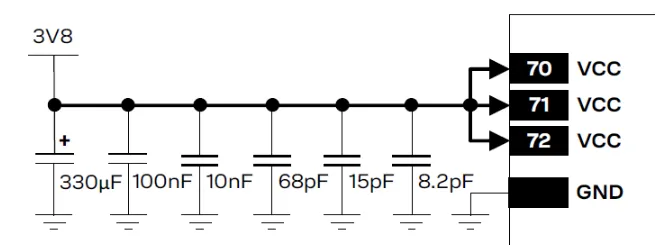
cURL Too many subrequests by single Worker invocation. To configure this limit, refer to https://developers.cloudflare.com/workers/wrangler/configuration/#limits. cURL Too many subrequests by single Worker invocation. To configure this limit, refer to https://developers.cloudflare.com/workers/wrangler/configuration/#limits.7
| cURL Too many subrequests by single Worker invocation. To configure this limit, refer to https://developers.cloudflare.com/workers/wrangler/configuration/#limits | cURL Too many subrequests by single Worker invocation. To configure this limit, refer to https://developers.cloudflare.com/workers/wrangler/configuration/#limits | cURL Too many subrequests by single Worker invocation. To configure this limit, refer to https://developers.cloudflare.com/workers/wrangler/configuration/#limits |
|---|---|---|
| cURL Too many subrequests by single Worker invocation. To configure this limit, refer to https://developers.cloudflare.com/workers/wrangler/configuration/#limits8 | 高 | cURL Too many subrequests by single Worker invocation. To configure this limit, refer to https://developers.cloudflare.com/workers/wrangler/configuration/#limits. |
| cURL Too many subrequests by single Worker invocation. To configure this limit, refer to https://developers.cloudflare.com/workers/wrangler/configuration/#limits | Medium | cURL Too many subrequests by single Worker invocation. To configure this limit, refer to https://developers.cloudflare.com/workers/wrangler/configuration/#limits. |
| cURL Too many subrequests by single Worker invocation. To configure this limit, refer to https://developers.cloudflare.com/workers/wrangler/configuration/#limits | Low | cURL Too many subrequests by single Worker invocation. To configure this limit, refer to https://developers.cloudflare.com/workers/wrangler/configuration/#limits. |
cURL Too many subrequests by single Worker invocation. To configure this limit, refer to https://developers.cloudflare.com/workers/wrangler/configuration/#limits.
結論
cURL Too many subrequests by single Worker invocation. To configure this limit, refer to https://developers.cloudflare.com/workers/wrangler/configuration/#limits.
"cURL Too many subrequests by single Worker invocation. To configure this limit, refer to https://developers.cloudflare.com/workers/wrangler/configuration/#limits. ↩
"cURL Too many subrequests by single Worker invocation. To configure this limit, refer to https://developers.cloudflare.com/workers/wrangler/configuration/#limits. ↩
"cURL Too many subrequests by single Worker invocation. To configure this limit, refer to https://developers.cloudflare.com/workers/wrangler/configuration/#limits. ↩
"cURL Too many subrequests by single Worker invocation. To configure this limit, refer to https://developers.cloudflare.com/workers/wrangler/configuration/#limits. ↩
"cURL Too many subrequests by single Worker invocation. To configure this limit, refer to https://developers.cloudflare.com/workers/wrangler/configuration/#limits. ↩
"cURL Too many subrequests by single Worker invocation. To configure this limit, refer to https://developers.cloudflare.com/workers/wrangler/configuration/#limits. ↩
"cURL Too many subrequests by single Worker invocation. To configure this limit, refer to https://developers.cloudflare.com/workers/wrangler/configuration/#limits. ↩
"cURL Too many subrequests by single Worker invocation. To configure this limit, refer to https://developers.cloudflare.com/workers/wrangler/configuration/#limits. ↩

 Japanese
  English
  Spanish
  French
  Arabic
  Vietnamese
  Indonesian
  Hindi
Hindi  Danish
  Bulgarian