
You see a receiver design with an attenuator1 before the LNA2 and it feels wrong. Why reduce a weak signal? This post explains this smart trade-off.
An attenuator is placed before an LNA to improve the receiver's blocking performance3. It prevents strong, out-of-band signals from saturating the LNA. This preserves the amplifier's linearity and ensures it can properly process the weak, desired signal in a noisy environment.
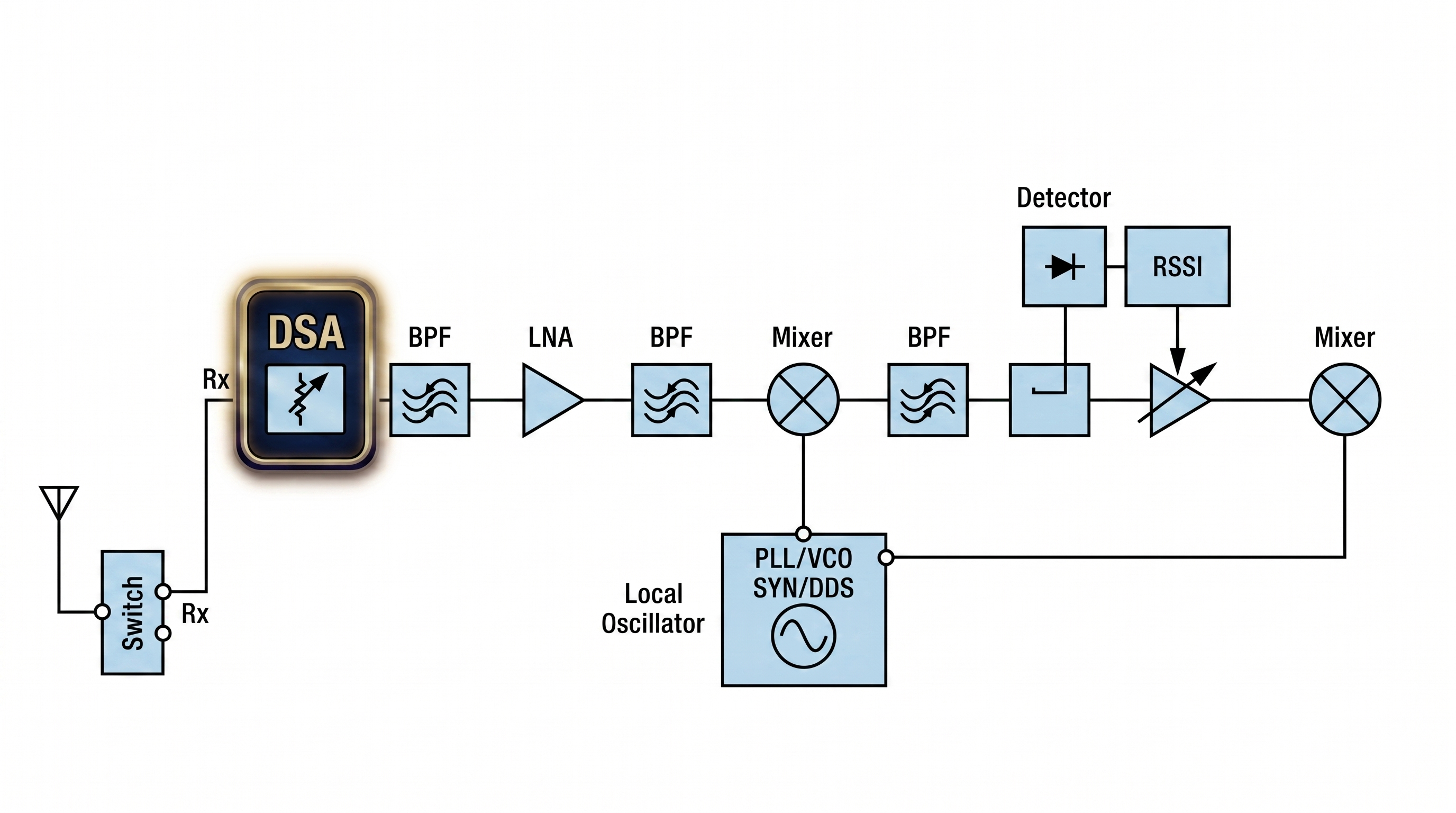
I remember the first time I saw this in a TDD base station diagram. My first thought was, "This must be a mistake. The receiver signal is already weak, we need to amplify it, not attenuate it!" I believe many engineers who are new to receiver blocking specifications have had similar doubts. But after I dug into it, I realized that RF design4 is truly an art of making smart trade-offs. To understand this design choice, we first need to ask a more fundamental question about the star of the show.
What Is the Real Job of a Low Noise Amplifier (LNA)?
Most of us think an LNA2’s only job is to amplify weak signals. This simple view can lead to poor design choices, especially when your device fails in the real world. Understanding an LNA's true purpose is the key to building robust receivers.
An LNA's main job is not just to provide gain, but to amplify a signal while adding the absolute minimum amount of its own noise. This action sets the le facteur de bruit5 for the entire receiver chain6, maximizing the en ligne entre votre antenne et votre analyseur de spectre. Un LNA augmente la puissance de tout ce qu’il reçoit, mais sa caractéristique principale est qu’il ajoute très peu de bruit lui-même. Cela augmente le7 (SNR) for all the components that follow.
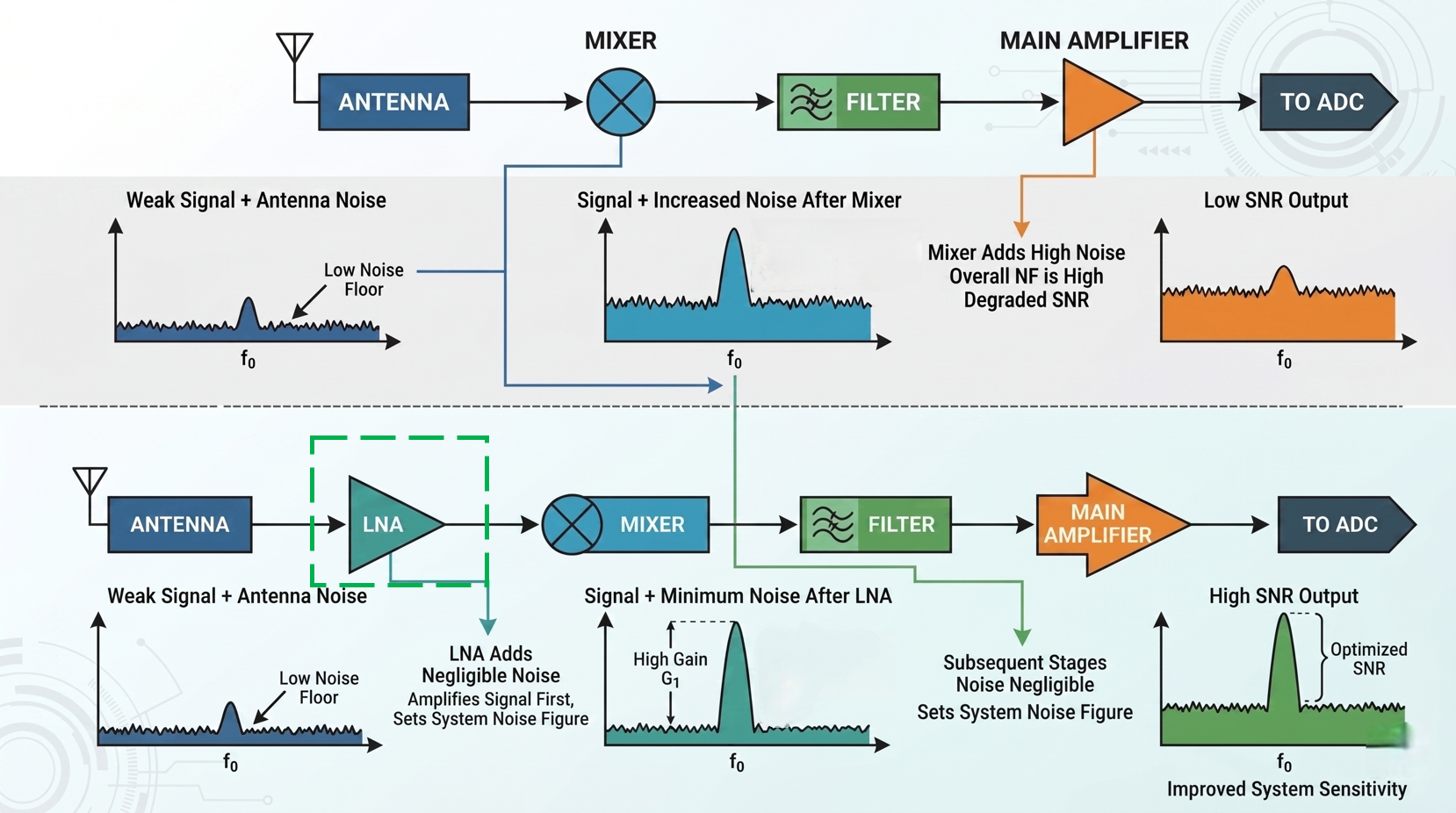
The core idea behind a receiver is to successfully recover a very weak signal. The quality of that recovery is measured by the en ligne entre votre antenne et votre analyseur de spectre. Un LNA augmente la puissance de tout ce qu’il reçoit, mais sa caractéristique principale est qu’il ajoute très peu de bruit lui-même. Cela augmente le7 (SNR). Every component in your receiver chain6 adds some noise. According to the Friis formula for cascaded le facteur de bruit5, the noise contribution of the very first component has the biggest impact on the entire system's performance.
This is why we use an LNA as the first active component. Its job is to provide enough gain to make the noise from later components (like mixers and filters) insignificant in comparison. For instance, our LNAs at Safari Microwave are designed for this exact purpose, with some models offering a le facteur de bruit5 as low as 0.5 dB, even at frequencies up to 110 GHz. By adding a clean boost to the signal upfront, the LNA2 defines a strong SNR for the rest of the chain. But this all assumes we live in a perfect world with no interference.
How Does Receiver Blocking Ruin Your Signal?
Your receiver works perfectly in the lab, but it fails in the field. You can't figure out why your weak signal is getting lost, even with a high-gain LNA. The problem could be strong, invisible interference that is overloading your receiver.
Blocking happens when a powerful interfering signal, even one outside your desired frequency, enters the LNA. This strong "blocker" can push the amplifier into saturation, reducing its gain and linearity. As a result, the LNA can no longer properly amplify your weak, desired signal.
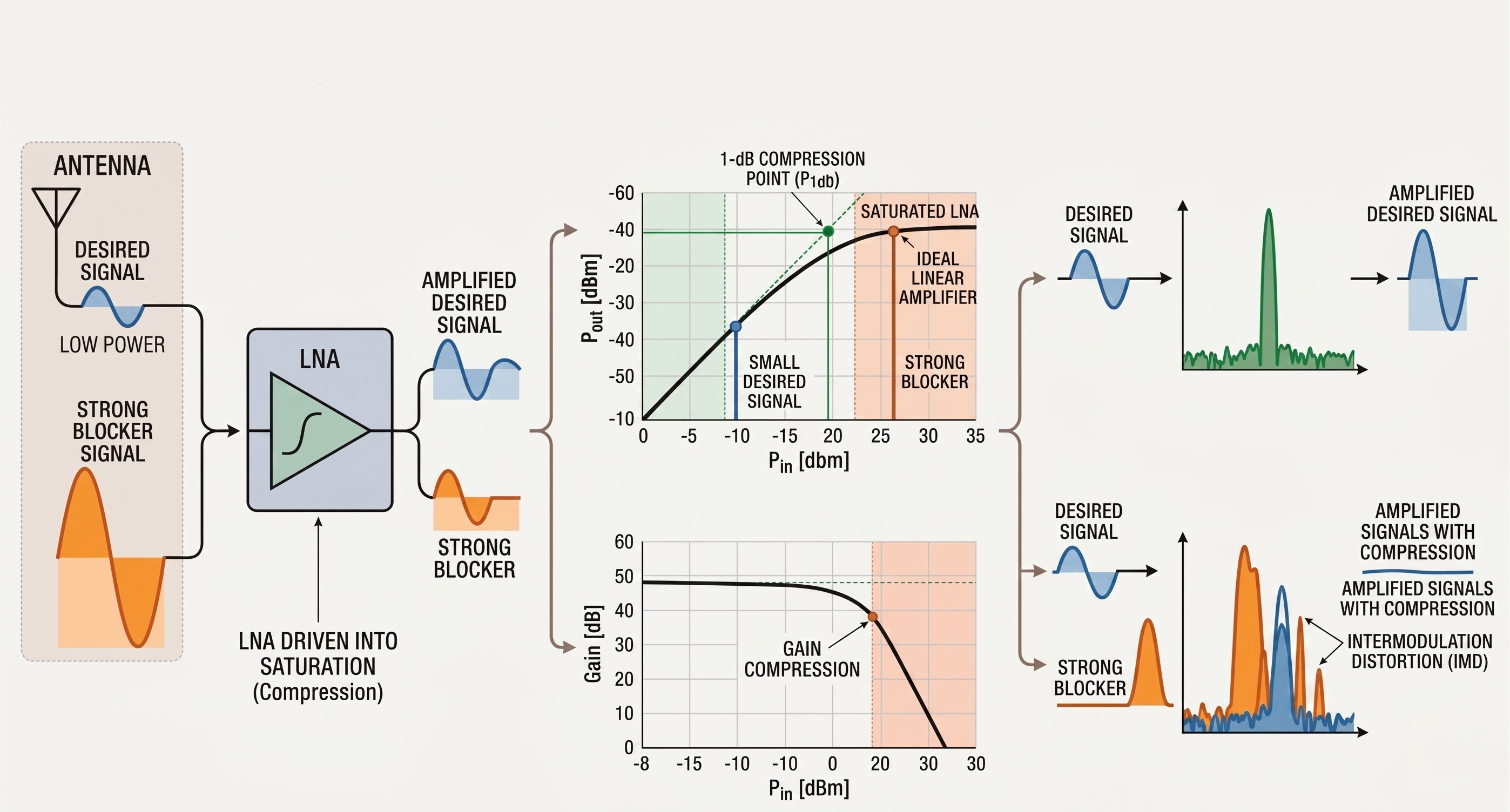
Every amplifier has a limit to how much power it can handle before its performance degrades. This is often defined by its 1dB compression point (P1dB). When an input signal is strong enough to push the amplifier near or past its P1dB, the amplifier becomes non-linear. The gain drops, not just for the strong signal, but for every signal passing through it.
Imagine your desired signal is a quiet conversation at -90 dBm, and your LNA provides 20 dB of gain. In a quiet environment, the output is a healthy -70 dBm. Now, add a strong blocker signal from a nearby transmitter. This blocker is so strong that it pushes the LNA into 10 dB of gain compression8. Your LNA's gain is now only 10 dB. Your desired signal now only comes out at -80 dBm, much closer to the noise floor and harder to decode. The blocker effectively "deafened" your receiver.
| Condition | Desired Signal In | Blocker | cURL Too many subrequests by single Worker invocation. To configure this limit, refer to https://developers.cloudflare.com/workers/wrangler/configuration/#limits | cURL Too many subrequests by single Worker invocation. To configure this limit, refer to https://developers.cloudflare.com/workers/wrangler/configuration/#limits | cURL Too many subrequests by single Worker invocation. To configure this limit, refer to https://developers.cloudflare.com/workers/wrangler/configuration/#limits |
|---|---|---|---|---|---|
| cURL Too many subrequests by single Worker invocation. To configure this limit, refer to https://developers.cloudflare.com/workers/wrangler/configuration/#limits | -90 dBm | cURL Too many subrequests by single Worker invocation. To configure this limit, refer to https://developers.cloudflare.com/workers/wrangler/configuration/#limits | 20 dB | cURL Too many subrequests by single Worker invocation. To configure this limit, refer to https://developers.cloudflare.com/workers/wrangler/configuration/#limits | cURL Too many subrequests by single Worker invocation. To configure this limit, refer to https://developers.cloudflare.com/workers/wrangler/configuration/#limits |
| cURL Too many subrequests by single Worker invocation. To configure this limit, refer to https://developers.cloudflare.com/workers/wrangler/configuration/#limits | -90 dBm | Présent | cURL Too many subrequests by single Worker invocation. To configure this limit, refer to https://developers.cloudflare.com/workers/wrangler/configuration/#limits | cURL Too many subrequests by single Worker invocation. To configure this limit, refer to https://developers.cloudflare.com/workers/wrangler/configuration/#limits | cURL Too many subrequests by single Worker invocation. To configure this limit, refer to https://developers.cloudflare.com/workers/wrangler/configuration/#limits |
cURL Too many subrequests by single Worker invocation. To configure this limit, refer to https://developers.cloudflare.com/workers/wrangler/configuration/#limits.
cURL Too many subrequests by single Worker invocation. To configure this limit, refer to https://developers.cloudflare.com/workers/wrangler/configuration/#limits
cURL Too many subrequests by single Worker invocation. To configure this limit, refer to https://developers.cloudflare.com/workers/wrangler/configuration/#limits.
cURL Too many subrequests by single Worker invocation. To configure this limit, refer to https://developers.cloudflare.com/workers/wrangler/configuration/#limits.
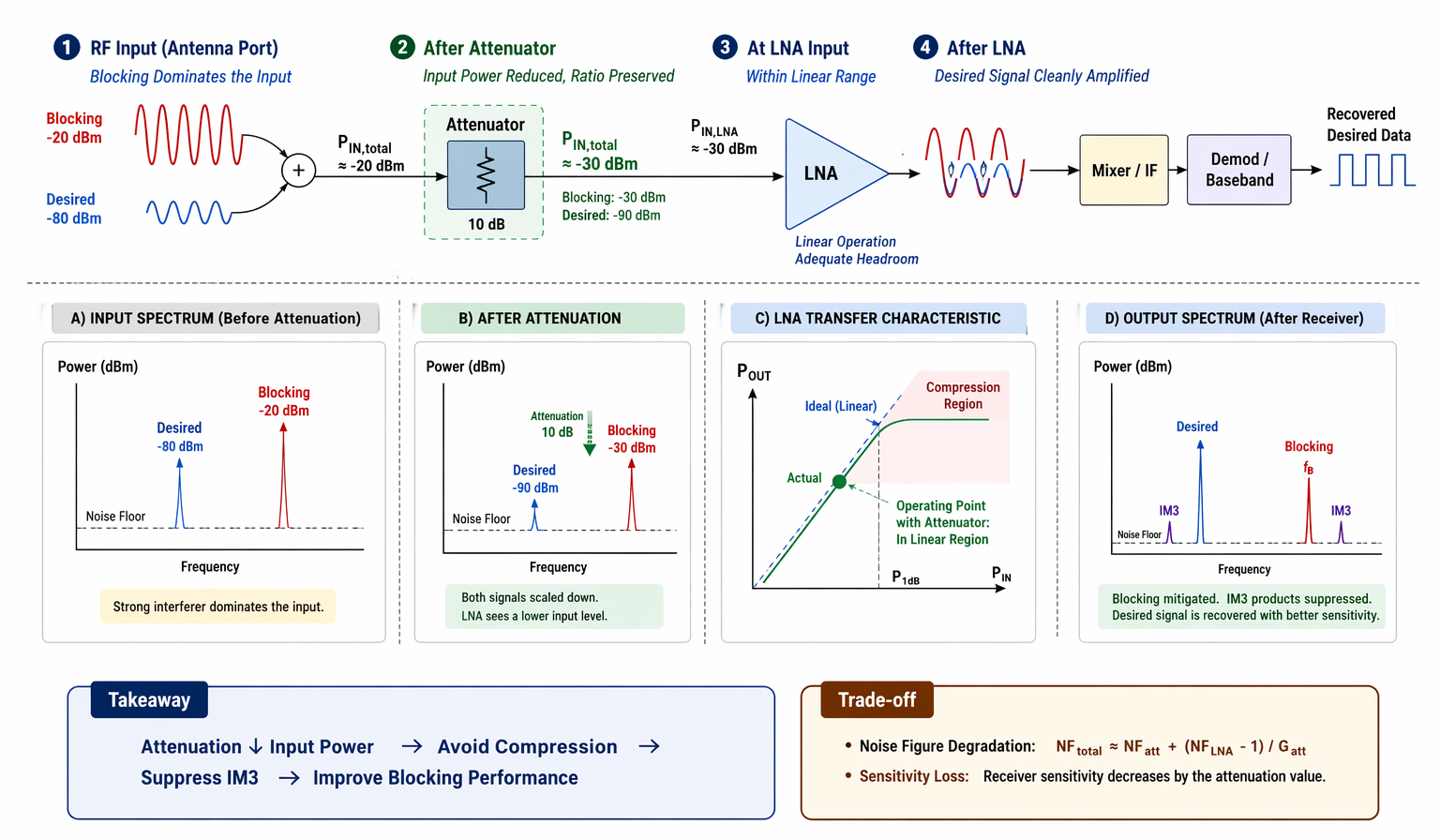
cURL Too many subrequests by single Worker invocation. To configure this limit, refer to https://developers.cloudflare.com/workers/wrangler/configuration/#limits attenuator1 cURL Too many subrequests by single Worker invocation. To configure this limit, refer to https://developers.cloudflare.com/workers/wrangler/configuration/#limits le facteur de bruit5. cURL Too many subrequests by single Worker invocation. To configure this limit, refer to https://developers.cloudflare.com/workers/wrangler/configuration/#limits.
cURL Too many subrequests by single Worker invocation. To configure this limit, refer to https://developers.cloudflare.com/workers/wrangler/configuration/#limits LNA2.
cURL Too many subrequests by single Worker invocation. To configure this limit, refer to https://developers.cloudflare.com/workers/wrangler/configuration/#limits.
| cURL Too many subrequests by single Worker invocation. To configure this limit, refer to https://developers.cloudflare.com/workers/wrangler/configuration/#limits | cURL Too many subrequests by single Worker invocation. To configure this limit, refer to https://developers.cloudflare.com/workers/wrangler/configuration/#limits | Blocker at LNA Input | LNA Gain for Signal | System NF | SNR en sortie |
|---|---|---|---|---|---|
| No Attenuator | LNA | -10 dBm (High) | 5 dB (Compressed) | 1.5 dB | Poor |
| With 6dB Attenuator | Attenuator -> LNA | -16 dBm (Linear) | 20 dB (Full Gain) | 7.5 dB | Good |
As you can see, accepting a higher system noise figure (7.5 dB vs 1.5 dB) results in a much better final SNR because the amplifier is actually able to do its job. This is the art of balance.
How Do You Choose the Right Components for the Trade-Off?
You know you need to balance noise figure and blocking, but how do you select the right parts? Choosing the wrong LNA or attenuator can either fail to solve the problem or degrade your sensitivity too much. Making a smart choice requires looking at the system as a whole.
To balance this trade-off, analyze your system's expected signal and interference levels. Choose an LNA with a high P1dB (linearity) for better blocking rejection. Then, select the minimum attenuation needed to keep the strongest expected blocker below the LNA's compression point.
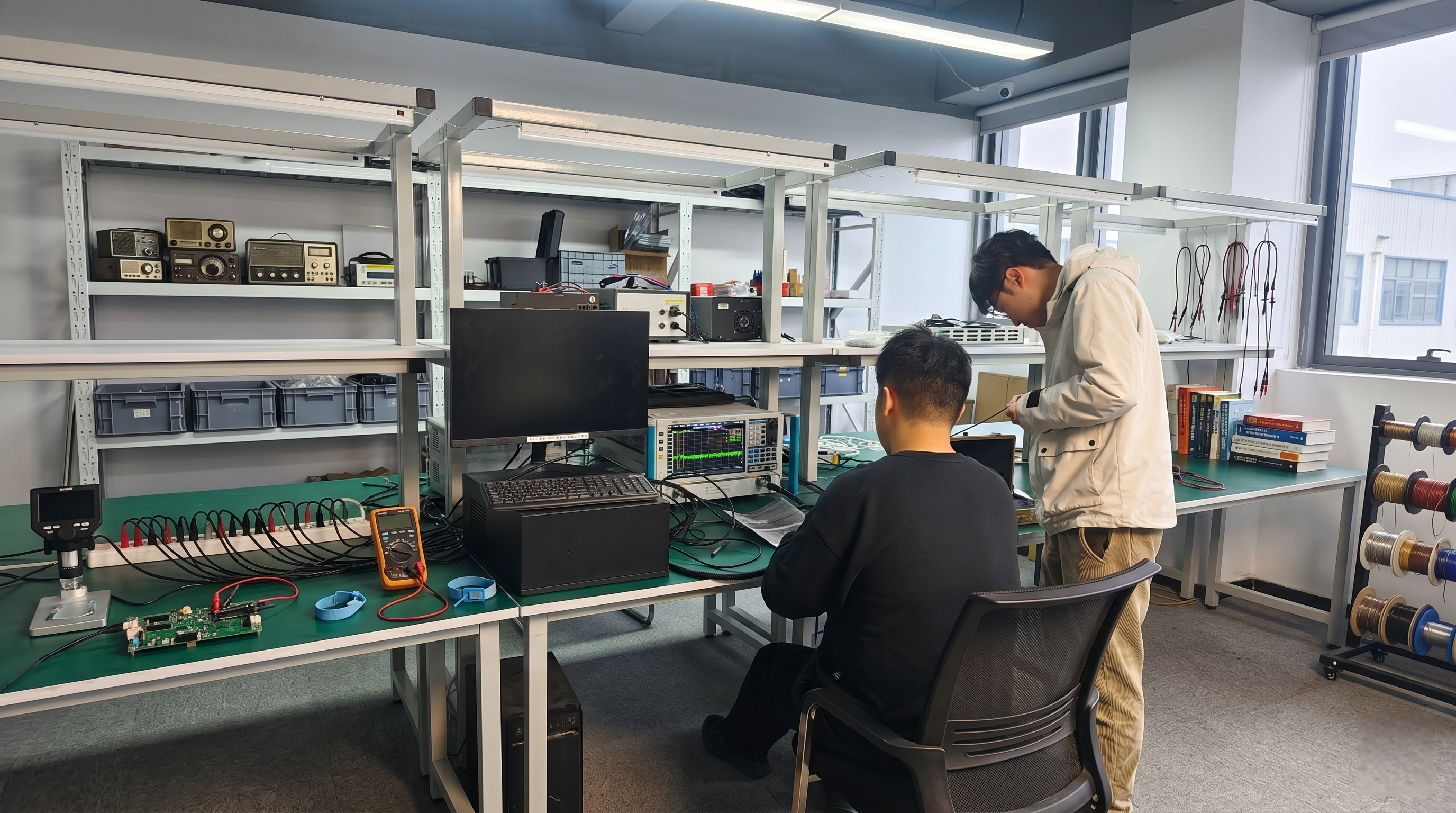
When selecting an LNA, don't just look for the lowest noise figure. In environments with strong interference, the P1dB and OIP39 (Third-Order Intercept Point) are just as important, if not more so. A robust LNA with a higher P1dB can withstand stronger blockers before it goes into compression. At Safari Microwave, many of our LNAs, including our ultra-wideband models that go up to 110 GHz, are designed with excellent linearity for this very reason.
For the attenuator, you want just enough attenuation to protect the LNA, but no more. For dynamic environments, a switchable solution is even better. You can use a fast RF PIN switch, like our 50ns SP8T models, to create a path that bypasses the attenuator in low-interference conditions to get the best sensitivity. When a strong blocker is detected, the switch can route the signal through the attenuator to protect the chain. This gives you the best of both worlds. It’s not about finding one perfect component, but about designing a smart system that can adapt to real-world challenges.
Conclusion
So, an attenuator before an LNA is not a design flaw. It's a clever engineering trade-off to protect receiver performance against blocking, proving RF design is the art of balance.
Understanding the role of an attenuator can clarify its importance in managing signal strength and preventing saturation. ↩
Exploring the function of an LNA will help you appreciate its critical role in amplifying weak signals effectively. ↩
Learn how blocking performance impacts the overall effectiveness of a receiver in real-world scenarios. ↩
Exploring RF design principles can enhance your understanding of creating effective communication systems. ↩
Discover how noise figure influences the performance of RF systems and the importance of minimizing it. ↩
A receiver chain is fundamental to signal processing; understanding it can improve your design strategies. ↩
Understanding SNR is crucial for evaluating the quality of signal recovery in communication systems. ↩
Gain compression can severely impact signal quality; understanding it is key for effective RF design. ↩
OIP3 is essential for understanding an amplifier's linearity and its ability to handle interference. ↩

 French (Belgium)
  English
  Spanish (Spain)
  Arabic
  French (France)
  Vietnamese
  Indonesian
  Belarusian
  Moroccan Arabic
  Tibetan
  Danish
  Bulgarian
  Bosnian
  Catalan
  Frisian
  Japanese
  Bashkir
  Cebuano
  Estonian
  Hindi
Hindi  Kurdish
  Tahitian
  Spanish (Colombia)
  Croatian
  Breton
  Georgian